Now Reading: AI Tool for Excel That Save Hours of Manual Work
-
01
AI Tool for Excel That Save Hours of Manual Work

Managing spreadsheets no longer has to be a time consuming task. The best AI tool for Excel can automate formulas, analyze data, generate reports, and simplify repetitive workflows, helping individuals and businesses work faster with greater accuracy.
Whether you use Excel daily or occasionally, AI powered tools can significantly improve productivity while reducing manual effort.
Excel has remained one of the most trusted spreadsheet applications for years, serving businesses, students, analysts, accountants, and professionals across industries. However, as datasets become larger and workflows become more complex, manually creating formulas, organizing information, and analyzing data can consume valuable time.
Artificial intelligence has transformed the way people work with spreadsheets by introducing intelligent automation, natural language assistance, and advanced data analysis capabilities.
Choosing the right AI tool for Excel depends on your workflow, the size of your datasets, and the level of automation you require. Some tools integrate directly into Excel, while others also support Google Sheets and business intelligence platforms. Understanding the strengths of each option can help you select the most suitable solution for your needs.
Why Use an AI Tool for Excel?
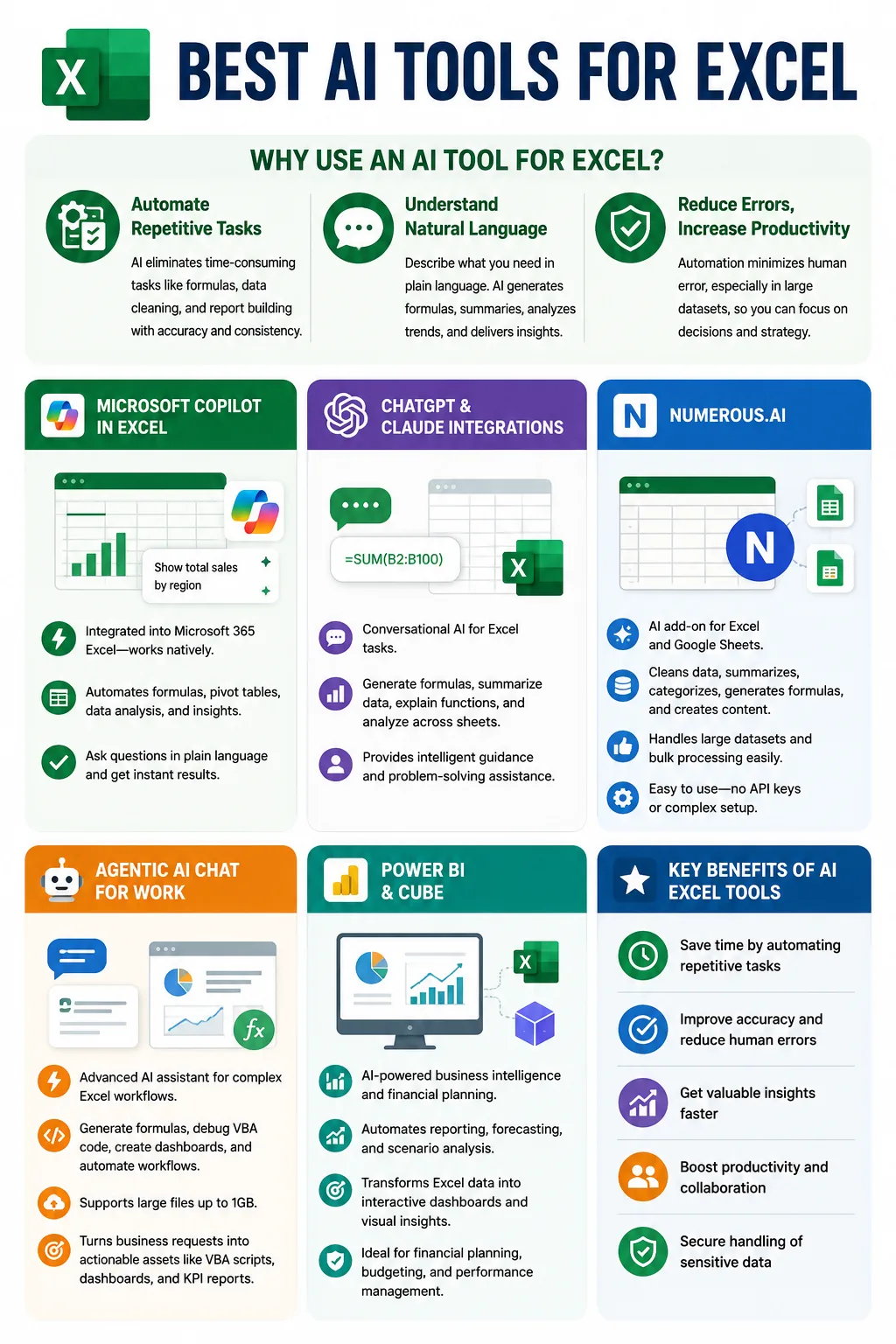
Artificial intelligence has changed spreadsheet management by eliminating many repetitive and time consuming tasks. Instead of manually writing formulas, cleaning datasets, or building reports, AI powered solutions perform these tasks automatically while maintaining consistency and accuracy.
An AI tool for Excel can understand natural language instructions, making spreadsheet management easier for both beginners and experienced users. Rather than remembering complex formulas or navigating multiple Excel features, users can simply describe what they want to accomplish. The AI then generates formulas, creates summaries, analyzes trends, and provides actionable insights.
Automation also reduces the likelihood of human error, especially when handling large datasets. This allows professionals to focus more on decision making and business strategy instead of spending hours performing repetitive spreadsheet operations.
Microsoft Copilot in Excel
Microsoft Copilot is one of the most powerful AI solutions available for Excel users because it is integrated directly into Microsoft 365. Since it works inside the familiar Excel environment, users can access AI powered assistance without switching between different applications.
Copilot helps automate everyday spreadsheet tasks such as generating formulas, creating pivot tables, analyzing data, and producing meaningful insights. Instead of manually building complex calculations, users can ask questions in plain language and receive immediate results.
Get started with Copilot in Excel
This native integration makes Microsoft Copilot particularly valuable for organizations already using Microsoft 365. It enhances productivity while preserving the familiar Excel experience, making adoption simple for existing users.
ChatGPT and Claude Integrations
ChatGPT and Claude offer conversational AI capabilities that can assist users with various Excel related tasks. Although these tools are not built directly into Excel in the same way as Microsoft Copilot, they provide valuable assistance through natural language interactions.
Best AI like Chatgpt for Customer Support
Users can generate Excel formulas, summarize datasets, explain spreadsheet functions, and analyze information across multiple worksheets. These AI assistants also help simplify complex spreadsheet tasks by providing easy to understand explanations and recommendations.
ChatGPT for Excel and Google Sheets
While they may not support native bulk processing directly inside Excel, they remain highly useful for users seeking intelligent guidance, formula generation, and spreadsheet problem solving through conversation.
Numerous.ai
Numerous.ai is a dedicated AI add on designed for both Excel and Google Sheets. It brings ChatGPT powered capabilities directly into spreadsheets, allowing users to automate numerous repetitive tasks without requiring advanced technical knowledge.
The platform can clean datasets, summarize information, categorize records, generate formulas, and even create written content directly within spreadsheets. One of its key strengths is its ability to handle large datasets efficiently while supporting bulk processing.
Automate Excel workflows with Numerous.ai
Another major advantage of Numerous.ai is its ease of use. Users do not need API keys or complicated configurations, making it an accessible solution for professionals, businesses, and individuals who want to automate spreadsheet tasks quickly.
Its compatibility with both Excel and Google Sheets makes it a flexible choice for teams working across different spreadsheet platforms.
Agentic AI Chat for Work
Agentic AI provides an advanced AI assistant capable of automating complex Excel workflows beyond basic spreadsheet operations. It is particularly useful for professionals handling large files and sophisticated business reporting tasks.
The platform can generate Excel formulas, debug VBA code, create dashboards, automate repetitive workflows, and build KPI reports. It also supports uploading files as large as one gigabyte, making it suitable for organizations working with extensive datasets.
One of the most valuable features of Agentic AI is its ability to convert detailed business requests into actionable spreadsheet assets. Users can generate VBA scripts, dashboards, and automated reports through simple natural language instructions, significantly reducing manual development time.
Power BI and Cube
Some organizations require automation that extends beyond traditional spreadsheets. In these situations, Power BI and Cube provide advanced AI powered capabilities that integrate Excel data into broader business intelligence and financial planning workflows.
These platforms automate reporting, forecasting, and scenario analysis while transforming spreadsheet information into interactive dashboards and visual reports. Businesses involved in financial planning, budgeting, and performance management can benefit from these intelligent automation features.
Cube financial planning software
For professionals managing enterprise level reporting and business intelligence, integrating Excel with Power BI or Cube creates a more comprehensive analytical environment that supports faster and more informed decision making.
Features to Consider When Choosing an AI Tool for Excel
Selecting the right AI tool for Excel involves more than simply comparing popular platforms. Different users have different requirements depending on the complexity of their workflows and the size of their datasets.
A seamless integration with Excel or Google Sheets should be a top priority because it eliminates unnecessary file transfers and allows users to continue working within familiar applications.
The ability to process large amounts of data efficiently is equally important. Professionals working with extensive spreadsheets need AI tools capable of handling bulk operations without compromising speed or accuracy.
Advanced AI capabilities should also extend beyond formula generation. The best solutions assist with pivot tables, chart creation, natural language queries, forecasting, summarization, and intelligent data classification.
Data privacy and security remain critical considerations, especially for organizations handling confidential business information. Choosing a solution with strong security measures helps protect sensitive data while maintaining compliance with internal policies.
Flexibility is another valuable characteristic. AI platforms that support multiple types of analysis, reporting, forecasting, and automation provide greater long term value as business requirements evolve.
Benefits of Using AI Powered Excel Automation
The growing popularity of AI spreadsheet automation is driven by the significant productivity improvements it delivers.
| Benefit | How AI Improves Excel Workflows |
|---|---|
| Saves Time | Instead of spending hours performing repetitive operations, professionals can complete complex tasks within minutes. |
| Improves Accuracy | AI powered automation minimizes manual errors in formulas, calculations, and data processing, making it ideal for financial records, operational reports, and large business datasets. |
| Faster Decision Making | AI analyzes data, identifies patterns, summarizes findings, and generates valuable insights that would otherwise require significant manual effort. |
| Better Team Collaboration | Standardized AI driven workflows produce consistent results across teams, allowing employees to focus on interpreting data and making strategic business decisions instead of repetitive spreadsheet tasks. |
For businesses, these productivity gains often translate into reduced operational costs and more efficient use of employee time.
Which AI Tool for Excel Is Right for You?
The ideal AI tool for Excel depends on how you use spreadsheets on a daily basis.
Users already working within Microsoft 365 may find Microsoft Copilot to be the most convenient option because it is integrated directly into Excel and supports common spreadsheet tasks without requiring additional software.
Those looking for conversational AI assistance for formula generation, spreadsheet explanations, and data summarization may benefit from ChatGPT or Claude integrations.
Professionals who regularly use both Excel and Google Sheets may appreciate the flexibility of Numerous.ai, especially when handling large datasets, generating content, and automating repetitive spreadsheet operations.
Businesses requiring advanced workflow automation, dashboard creation, VBA scripting, and large file support may find Agentic AI to be a strong solution for end to end spreadsheet automation.
Organizations focused on business intelligence, financial planning, forecasting, and enterprise reporting can extend Excel capabilities through Power BI and Cube to build a comprehensive data analysis ecosystem.
Ultimately, selecting the right solution depends on your existing software environment, automation requirements, and the complexity of your spreadsheet workflows.
The Future of AI Powered Excel Automation
Artificial intelligence continues to reshape spreadsheet management by making advanced analysis more accessible to users of all skill levels. Future AI powered Excel solutions are expected to become even more capable of understanding natural language instructions, predicting user needs, and automating increasingly complex workflows.
As AI technology evolves, professionals will spend less time managing spreadsheets and more time interpreting results, developing strategies, and making informed business decisions. This shift allows organizations to improve productivity while maintaining higher levels of accuracy and efficiency.
Businesses adopting AI powered spreadsheet automation today are better positioned to manage growing volumes of data while remaining competitive in an increasingly data driven environment.
Reference:
10 Best AI Tools for Data Analysis in Excel & Google Sheets
Final Thoughts
The best AI tool for Excel can dramatically simplify spreadsheet management by automating formulas, cleaning data, generating reports, creating dashboards, and delivering valuable insights. Whether you prefer Microsoft Copilot for native Excel integration, ChatGPT and Claude for conversational assistance, Numerous.ai for spreadsheet automation across Excel and Google Sheets, Agentic AI for advanced workflow automation, or Power BI and Cube for business intelligence, each solution offers unique advantages. By selecting a tool that matches your workflow and automation needs, you can reduce manual work, improve accuracy, and make faster, more confident decisions with your Excel data.
Frequently Asked Questions
What is the best AI tool for Excel?
The best AI tool for Excel depends on your needs. Microsoft Copilot is ideal for Microsoft 365 users, while Numerous.ai, Agentic AI, ChatGPT, Claude, Power BI, and Cube each offer unique automation capabilities.
Can AI generate Excel formulas?
Yes. AI tools can create Excel formulas using natural language instructions, making it easier to perform calculations without manually writing complex formulas.
Does AI work with Google Sheets as well?
Yes. Some AI tools, including Numerous.ai, support both Excel and Google Sheets, allowing users to automate workflows across both platforms.
Can AI automate repetitive Excel tasks?
Yes. AI can automate repetitive tasks such as data cleaning, categorization, summarization, report generation, dashboard creation, and workflow automation.
Is Microsoft Copilot built into Excel?
Yes. Microsoft Copilot is integrated directly into Microsoft 365 Excel, allowing users to access AI powered assistance without leaving the Excel application.
Can AI analyze large Excel datasets?
Yes. Several AI tools are designed to process large datasets efficiently, helping users generate insights, summaries, forecasts, and reports more quickly.
What should I look for in an AI tool for Excel?
Look for seamless Excel integration, support for bulk data processing, advanced AI features, natural language capabilities, forecasting tools, and strong data privacy and security features.
Related searches:
- Best AI Tools for Academic Research and Literature Review
- AI Tools for Product Managers to Impress Your Boss
- Best AI Tools for Image Generation in 2026
- Best AI Tools for Automating Customer Support in Small Businesses

Dony Garvasis is the founder of Search Ethics, a freelance SEO consultant, and a passionate technology blogger. With over 8 years of experience in SEO, blogging and content marketing, I provide expert content on Tech, digital marketing, SEO, Artificial intelligence, gadgets, science, automobiles, lifestyle, tips, tutorials and much more. My mission is simple: Ethical Search, Genuine Results! I will make sure people everywhere get trustworthy and helpful information.