Now Reading: What is Wi Fi Network SSID
-
01
What is Wi Fi Network SSID
SSID means Service Set Identifier and it is the name of a Wi Fi network. It is the label your device sees when scanning for wireless networks and it helps you identify and connect to the correct router among many nearby options.
Wireless networking is part of everyday life and understanding basic terms like SSID helps users make better decisions about connectivity and security. Whether you are setting up a new router connecting a phone to Wi Fi or troubleshooting network issues the SSID is always involved. This article explains what an SSID is how it works why it matters and how to find and manage it effectively.
Understanding the meaning of SSID
SSID stands for Service Set Identifier. In simple terms it is the name assigned to a Wi Fi network. When you open the Wi Fi settings on a phone, laptop or tablet and see a list of available networks each of those names is an SSID.
The main purpose of an SSID is identification. In places like apartment, buildings, offices, cafes or airports multiple wireless networks operate at the same time. The SSID allows your device to distinguish one network from another and connect to the one you want.
An SSID does not provide access by itself. It only identifies the network. To actually connect to a secured network you still need the correct password or security key.
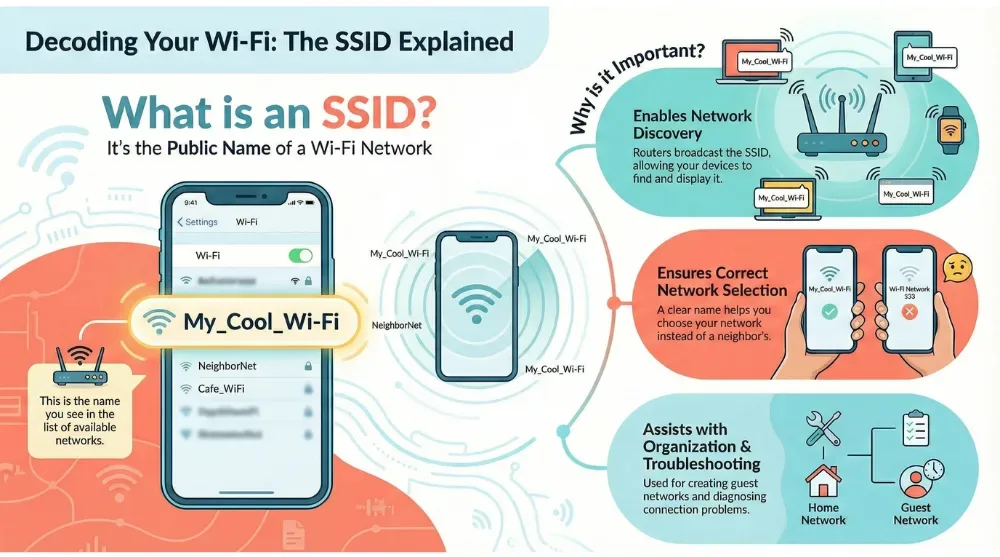
Decoding Your Wi-Fi SSID Explained Infographic
Why SSID is important in Wi Fi networking
The SSID plays a central role in how wireless networks function and how users interact with them. Without SSIDs connecting to Wi Fi would be confusing and unreliable especially in areas with many routers.
Here are the main reasons SSIDs are important;
| Main Reason | Why SSIDs Important? |
|---|---|
| Network discovery | Routers send regular beacon signals that include the SSID, allowing nearby devices to detect that a Wi Fi network is available for connection |
| Correct network selection | A recognizable SSID helps users choose their own home or office network instead of accidentally connecting to a nearby Wi Fi network |
| Network organization | Multiple SSIDs can be used in homes or businesses to separate usage, such as creating guest networks or grouping devices |
| Troubleshooting and management | Knowing the SSID makes it easier to diagnose connection issues and correctly configure new devices |
How SSIDs are broadcast by routers
Wireless routers and access points broadcast the SSID using beacon signals. These signals are sent at regular intervals and announce the presence of the network. Any Wi Fi enabled device within range can detect these signals and display the SSID in the list of available networks.
Broadcasting the SSID is the default behavior for most routers. It ensures easy discovery and quick connections. While it is technically possible to hide an SSID this does not provide strong security benefits and can sometimes cause connection issues.
The SSID broadcast does not include the network password. It only shares the network name and basic connection details.
Default SSID versus custom SSID
When you first set up a Wi Fi router it usually comes with a default SSID assigned by the manufacturer. This default name often includes the brand or model of the router.
| Aspect | Default SSID | Custom SSID |
|---|---|---|
| Definition | A pre assigned Wi Fi network name set by the router manufacturer | A user defined Wi Fi network name created during or after setup |
| Typical naming | Often includes the router brand or model name | Can be any meaningful or neutral name chosen by the user |
| Network recognition | Can be confusing in areas with many similar routers | Easier to identify among multiple nearby networks |
| Security awareness | May reveal router brand and model information | Removes clues that could help attackers identify hardware |
| Memorability | Harder to remember especially when adding new devices | Easier to remember and recognize when connecting devices |
| Recommended usage | Works but not ideal for long term use | Recommended for better clarity and security |
| Best practice | Comes enabled by default | Should avoid personal details like full name or address |
SSID characteristics and limitations
SSIDs follow specific rules defined by Wi Fi standards. Understanding these characteristics helps avoid configuration problems and ensures better compatibility across devices.
-
Case sensitivity
SSIDs are case sensitive, which means NetworkName and networkname are treated as two different Wi Fi network names. -
Length
An SSID can be up to 32 characters long. Shorter names are generally easier to recognize, remember, and enter on different devices. -
Character usage
Most routers support letters, numbers, and common symbols in SSIDs. Using simple characters helps reduce compatibility issues across older or limited devices. -
Uniqueness
SSIDs do not need to be globally unique, but using a name identical to nearby networks can cause confusion and connection problems. Choosing a distinctive name improves clarity and reliability.
SSID and Wi Fi security
An SSID alone does not secure a network. It only identifies it. Actual security comes from encryption and authentication methods.
Most modern Wi Fi networks use security standards such as WPA2 or WPA3 to protect data and prevent unauthorized access. These standards require a password or security key in addition to the SSID.
Changing the default SSID is considered a basic security best practice but it should always be combined with strong encryption and a unique password. Relying on the SSID alone does not protect a network.
It is also important to remember that hiding an SSID does not make a network truly secure. Devices still exchange information when connecting and experienced users can detect hidden networks.
Related search: Best Cybersecurity Tips for Protecting my Home Wi-Fi Network
How to find your SSID on different devices
Finding your SSID is usually simple and does not require technical skills. The method is similar across most platforms.
On smartphones
Open the Wi Fi settings. The network you are currently connected to is your SSID. Other nearby SSIDs appear in the available networks list.
On computers
On Windows or macOS click the Wi Fi icon in the system tray or menu bar. The connected network name is the SSID.
On routers
Many routers have a sticker on the back or bottom that shows the default SSID and password. You can also find the SSID by logging into the router’s settings page.
Knowing how to find your SSID is useful when connecting new devices or helping others join your network.
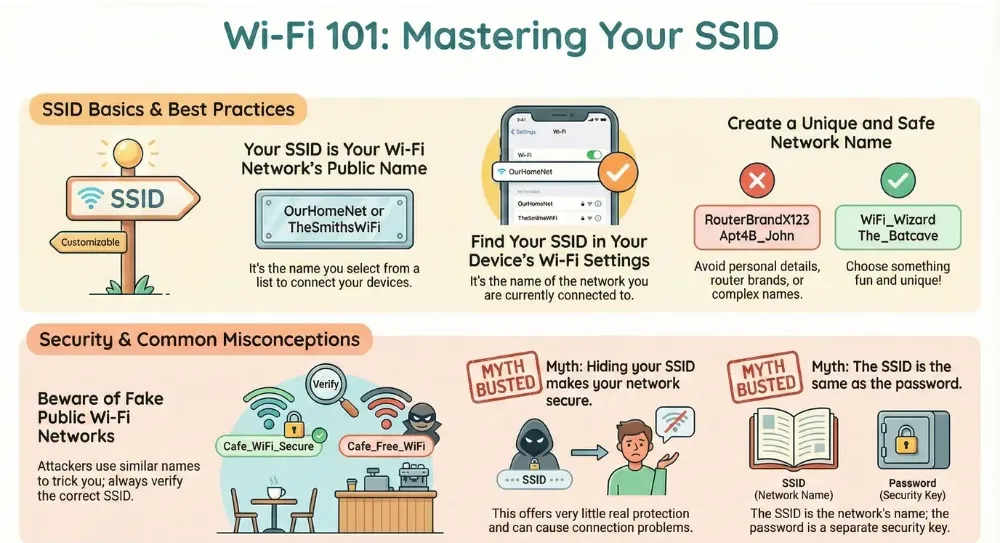
Wi-Fi 101: Mastering Your SSID Infographic
Can multiple networks have the same SSID
Yes multiple routers can use the same SSID. This is common in larger networks such as offices, hotels or campuses. In these cases multiple access points share the same SSID to allow seamless roaming.
In home environments using the same SSID as a nearby network can cause confusion. Your device may connect to the wrong router or experience unstable performance. Choosing a unique SSID helps avoid these problems.
SSID in public Wi Fi networks
Public Wi Fi networks also use SSIDs to identify themselves. In cafes airports or libraries the SSID is often displayed on signs or provided by staff.
When connecting to public Wi Fi it is important to confirm the correct SSID. Attackers sometimes create fake networks with similar names to trick users into connecting. Always verify the network name before entering any information.
Public networks may be unsecured or require a login page. In both cases the SSID is the first step in connecting.
Managing multiple SSIDs on one router
Many modern routers allow the creation of multiple SSIDs. This feature is useful for separating traffic and improving network control.
Common uses include
- A main SSID for trusted devices
- A guest SSID for visitors
- A separate SSID for smart home devices
Each SSID can have its own password and security settings. This setup improves privacy and reduces risk if one password is shared.
| Best Practice | Means? |
|---|---|
| Keep it simple and recognizable | Avoid long or complex names that are hard to read on small screens. |
| Avoid personal details | Do not include your full name, address, or apartment number. |
| Avoid router brand names | This reduces information exposure about your hardware. |
| Use a unique name | A distinctive SSID prevents confusion with nearby networks. |
Common misconceptions about SSID
There are several misunderstandings about what an SSID does and does not do.
SSID equals password
This is incorrect. The SSID is only the network name. The password is a separate security element.
Hiding SSID makes a network secure
Hiding the SSID offers little real protection and may cause connection issues.
Changing SSID breaks Wi Fi
- Changing the SSID only requires reconnecting devices. It does not damage the network.
- Clearing up these misconceptions helps users manage their networks with confidence.
The role of SSID in everyday connectivity
From streaming videos to working remotely SSIDs quietly support daily digital activities. Each time a device connects to Wi Fi it uses the SSID to locate and identify the correct network.
Understanding SSIDs empowers users to troubleshoot connection issues recognize trusted networks and avoid risky ones. This knowledge is especially valuable as more devices rely on wireless connectivity.
Bottom Line
An SSID or Service Set Identifier is simply the name of a Wi Fi network. It allows devices to find recognize and connect to the correct wireless network among many options. While it does not provide security by itself it plays a vital role in organization usability and network management. By choosing a clear custom SSID and combining it with strong security settings users can enjoy safer and more reliable Wi Fi connections.
Frequently asked questions
What does SSID stand for?
SSID stands for Service Set Identifier and it refers to the name of a Wi Fi network.
Is SSID the same as a Wi Fi password?
No. The SSID is the network name while the password is used to secure access to that network.
Can I change my SSID?
Yes. You can change the SSID through your router’s settings and reconnect your devices afterward.
Why do I see many SSIDs nearby?
Each SSID represents a different Wi Fi network broadcast by nearby routers or access points.
Does hiding an SSID improve security?
Hiding an SSID provides minimal security benefits and should not replace proper encryption and strong passwords.
You may love to hear the guide: How to change your SSID

Dony Garvasis is the founder of Search Ethics, a platform dedicated to transparency, authenticity, and ethical digital practices. With over 8 years of experience in SEO and digital marketing, I provide expert content on Tech, digital marketing, SEO, Artificial intelligence, gadgets, science, automobiles, lifestyle, tips, tutorials and much more. My mission is simple: Ethical Search, Genuine Results! I will make sure people everywhere get trustworthy and helpful information.