Now Reading: What Makes a Laptop Best for Graphic Design Work
-
01
What Makes a Laptop Best for Graphic Design Work
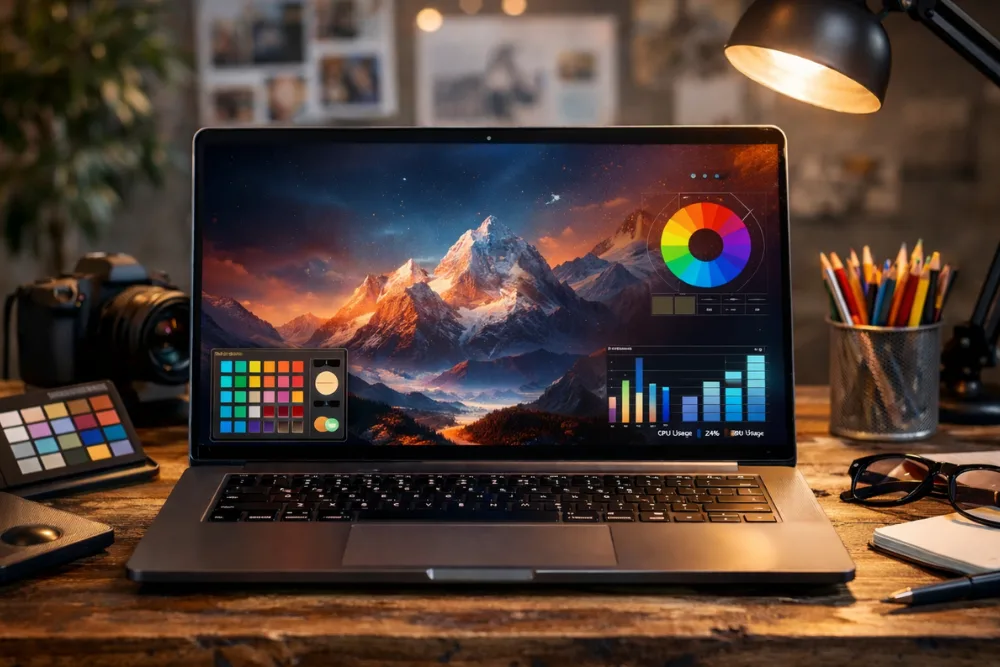
The best laptop for graphic design combines a color accurate high resolution display, a powerful processor, enough RAM, fast SSD storage, and reliable graphics performance to handle demanding creative software smoothly. When these elements work together, designers can create, edit, and export complex visuals efficiently without performance slowdowns or color inconsistencies.
Graphic design is both a creative and technical profession. Whether you are designing logos, editing photos, creating digital illustrations, or working with layered compositions, your laptop becomes the core tool that supports your ideas. Choosing the right device is not only about speed, it is also about visual accuracy, comfort during long work sessions, and long term reliability. This article explains in detail what truly makes a laptop suitable for professional graphic design work, using only essential and proven criteria.
Why choosing the right laptop matters for graphic designers
Graphic design software relies heavily on hardware performance. Applications such as Adobe Photoshop, Illustrator, and similar professional tools use processing power, memory, and graphics resources constantly. A laptop that lacks the right specifications can slow down your workflow, cause lag while editing, or display colors inaccurately, which can directly affect the quality of your work.
A well chosen laptop allows designers to focus on creativity rather than technical limitations. Smooth multitasking, fast file handling, and consistent color reproduction all contribute to higher productivity and better results. Over time, investing in the right laptop also reduces the need for frequent upgrades, making it a smart long term decision.
Display quality and color accuracy are essential
The display is the most important component of a graphic design laptop. Designers work visually, so the screen must present colors, contrast, and details accurately. A high resolution display is crucial, with Full HD considered the minimum standard. Many professionals prefer 4K displays because they offer sharper images and more workspace for detailed editing.
Color accuracy is equally important. A good design laptop should cover a wide color gamut such as 100 percent sRGB, Adobe RGB, or DCI P3. This ensures that the colors you see on screen closely match the final output, whether it is printed material or digital media. Without proper color coverage, designs may appear different on other screens or in print, leading to costly revisions.
Panel technology also plays a key role. IPS displays are widely preferred for their consistent color reproduction and wide viewing angles. OLED panels take this further by offering deeper blacks, higher brightness levels, and enhanced contrast. These qualities not only improve visual quality but also reduce eye strain during long design sessions, making OLED displays particularly attractive for professionals.
Related search: Top 5 Laptops for Graphic Design Professionals
The importance of a powerful processor for design tasks
The processor, or CPU, determines how efficiently your laptop can handle complex design operations. Graphic design software often performs multiple tasks at once, such as rendering effects, managing layers, and running background processes. A powerful processor ensures that these actions happen smoothly.
For graphic design work, a laptop should ideally feature an Intel Core i7 or i9, an AMD Ryzen 7 or 9, or Apple silicon chips like the M1 Pro or M1 Max. These processors offer multiple cores, usually eight or more, which allows the system to manage multitasking effectively. High clock speeds further improve responsiveness, especially when working with large files or exporting final designs.
A strong CPU is particularly valuable for designers who work with complex compositions, high resolution images, or elements that require real time previews. With sufficient processing power, creative workflows remain uninterrupted and efficient.
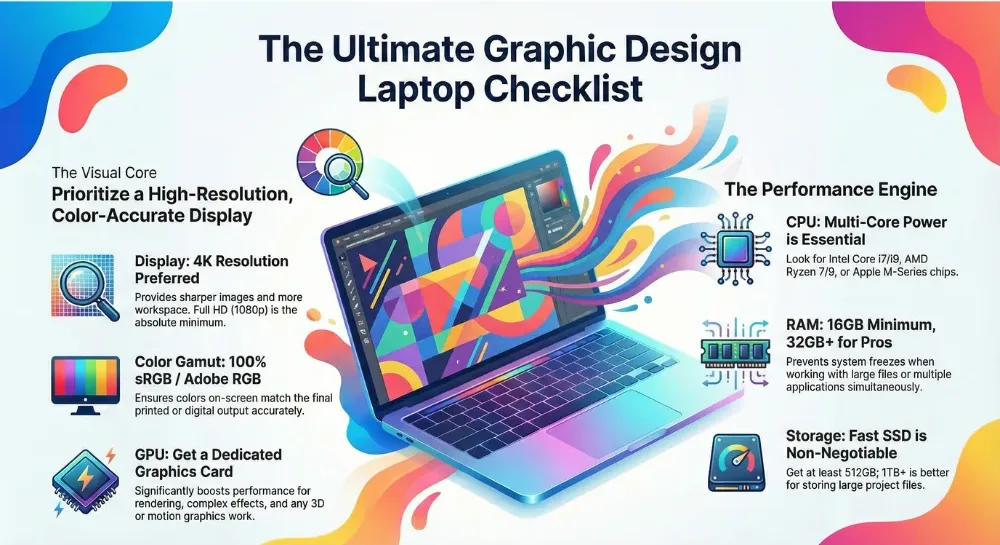
Ultimate Graphic Design Laptop Checklist Infographic
RAM requirements for smooth multitasking
Random Access Memory, commonly known as RAM, is another critical factor in graphic design performance. RAM allows your laptop to store and access data quickly while applications are running. When working with large design files or multiple programs simultaneously, sufficient RAM prevents slowdowns and system freezes.
A minimum of 16GB of RAM is recommended for most graphic design tasks. This amount supports smooth operation when using professional design software and handling moderately complex projects. For advanced or professional level work, especially when dealing with very large files or multiple applications at once, 32GB or more is ideal.
More RAM provides breathing room for your system, allowing designers to switch between tools, manage layers, and preview changes without delays. This directly enhances productivity and reduces frustration during intensive creative sessions.
Fast and ample storage improves workflow efficiency
Storage type and capacity significantly affect how quickly a laptop can load software and open or save files. Solid State Drives, or SSDs, are essential for graphic design laptops. Compared to traditional hard drives, SSDs offer much faster read and write speeds, resulting in quicker boot times and near instant access to design assets.
A minimum of 512GB SSD storage is recommended for graphic designers. This capacity accommodates operating systems, design software, and a reasonable collection of project files. However, many professionals prefer 1TB or more, especially if they store large image libraries, fonts, templates, and ongoing projects locally.
Fast storage ensures that designers spend less time waiting and more time creating. It also improves overall system responsiveness, making the laptop feel smooth and reliable even under heavy workloads.
The role of a dedicated graphics card
Graphics processing units, or GPUs, handle visual rendering tasks. While integrated graphics can manage basic graphic design work, a dedicated GPU from NVIDIA or AMD offers a significant performance boost for more demanding projects.
A dedicated graphics card is especially beneficial for tasks such as rendering complex effects, working with high resolution images, or incorporating 3D elements into designs. It offloads visual processing from the CPU, allowing the system to perform more efficiently overall.
For designers who frequently use advanced features or work with motion graphics and 3D components, a dedicated GPU can make a noticeable difference in speed and responsiveness. Even for standard design work, it adds an extra layer of performance stability and future readiness.
Portability and build quality for designers on the move
Many graphic designers work from multiple locations, including studios, offices, cafes, or client sites. For this reason, portability and build quality are important considerations. A laptop that is lightweight yet sturdy allows designers to work comfortably wherever inspiration strikes.
Durable construction ensures that the device can withstand daily transport without damage. Materials such as aluminum or reinforced composites often provide better longevity. Good battery life is also essential, enabling uninterrupted work sessions without constant reliance on power outlets.
Connectivity matters as well. A design laptop should include sufficient ports such as USB, Thunderbolt, HDMI, and SD card slots. These ports support external displays, storage devices, cameras, and other peripherals commonly used in creative workflows. Reliable connectivity streamlines file transfers and expands the laptop’s versatility.
Display size and workspace considerations
Screen size directly affects comfort and productivity in graphic design. A 15 inch or larger display provides ample workspace for tool panels, timelines, and detailed editing. Larger screens reduce the need for excessive zooming or window switching, which can slow down the creative process.
While bigger displays offer more room, they should not compromise portability. Many modern laptops balance generous screen sizes with slim designs, making them suitable for both desk work and travel. Choosing the right size depends on individual preferences and work habits, but sufficient screen real estate is a clear advantage for design tasks.
Stylus support and creative flexibility
For digital artists and illustrators, stylus support can be a valuable feature. Laptops that support pen input allow designers to sketch, draw, and annotate directly on the screen. This can feel more natural than using a mouse or trackpad, especially for freehand illustration and detailed retouching.
Stylus compatibility adds creative flexibility, enabling a more hands on approach to design. While not essential for all graphic designers, it is a useful option for those who blend traditional drawing techniques with digital workflows.
Balancing performance and long term value
The best laptop for graphic design strikes a balance between performance, visual quality, and durability. Investing in strong core components ensures that the device remains capable as software evolves and project demands grow. A well balanced laptop reduces the need for frequent upgrades and supports consistent professional output over time.
Popular examples of laptops that meet these criteria include the Apple MacBook Pro M4 2024, ASUS Vivobook Pro OLED, and Lenovo ThinkPad X9. These devices are known for combining powerful hardware with high quality displays and solid build quality, making them suitable for demanding creative work.
Related search: Laptop Brands Preferred by Professional Graphic Designers
How these features support professional design workflows
Each hardware component plays a specific role in supporting graphic design tasks. The display ensures accurate visual representation, the CPU manages complex operations, RAM handles multitasking, storage speeds up file access, and the GPU enhances rendering performance. Together, these elements create a smooth and reliable environment for creative work.
When all these features are present and well balanced, designers can focus on creativity rather than technical constraints. This alignment between hardware and workflow is what truly defines a great graphic design laptop.
Bottom Line
Choosing the best laptop for graphic design work requires careful consideration of display quality, processing power, memory, storage, graphics performance, and overall usability. A color accurate high resolution screen, a powerful multi core processor, sufficient RAM, fast SSD storage, and a capable GPU form the foundation of an effective design machine. When combined with good portability, build quality, and connectivity, these features empower designers to work efficiently, accurately, and creatively across a wide range of projects.
Summary in table
| Aspect | Why It Matters for Graphic Designers | Recommended Specs / Notes |
|---|---|---|
| Overall Laptop Choice | Graphic design software constantly uses CPU, RAM, GPU, and display. Weak hardware causes lag, slow rendering, and inaccurate colors. | Choose balanced, high-performance hardware to avoid workflow interruptions. |
| Display Quality | Designers rely on precise visuals. Poor displays distort colors, contrast, and fine details. | Minimum Full HD; preferred 4K for sharper images and more workspace. |
| Color Accuracy | Ensures on-screen colors match final print or digital output. Prevents costly revisions. | 100% sRGB minimum; Adobe RGB or DCI-P3 preferred. |
| Panel Technology | Affects viewing angles, contrast, brightness, and eye comfort. | IPS for accuracy and consistency; OLED for deeper blacks and higher contrast. |
| Processor (CPU) | Handles rendering, layer management, effects, and background tasks. | Intel Core i7/i9, AMD Ryzen 7/9, or Apple M-series (Pro/Max). |
| RAM | Enables smooth multitasking and handling of large design files. | 16GB minimum; 32GB+ ideal for professional workloads. |
| Storage Type | Impacts software load times and file access speed. | SSD only (no HDD). NVMe SSD preferred. |
| Storage Capacity | Determines how many projects, assets, and software can be stored locally. | 512GB minimum; 1TB or more recommended. |
| Graphics Card (GPU) | Accelerates rendering, effects, high-resolution work, and 3D elements. | Integrated OK for basic work; dedicated NVIDIA/AMD GPU for advanced tasks. |
| Portability | Designers often work from multiple locations. | Lightweight design with strong performance balance. |
| Build Quality | Daily travel requires durability and long-term reliability. | Aluminum or reinforced chassis preferred. |
| Battery Life | Allows uninterrupted work sessions without constant charging. | All-day battery performance is ideal. |
| Connectivity & Ports | Supports external displays, storage, cameras, and peripherals. | USB-C/Thunderbolt, HDMI, SD card slot recommended. |
| Display Size | Larger screens improve workspace and reduce zooming or window switching. | 15-inch or larger for comfort; slim bezels help portability. |
| Stylus Support | Enables direct sketching, drawing, and detailed retouching. | Optional, but valuable for illustrators and digital artists. |
| Long-Term Value | Reduces need for frequent upgrades as software requirements grow. | Invest in strong core components for future readiness. |
| Workflow Impact | Well-balanced hardware removes technical barriers and boosts creativity. | Smooth performance allows focus on design, not limitations. |
Frequently asked questions
What display features matter most for graphic design?
High resolution, wide color gamut coverage such as sRGB or Adobe RGB, and panel types like IPS or OLED are most important for accurate and comfortable design work.
How much RAM is ideal for graphic designers?
Sixteen gigabytes is suitable for most tasks, while thirty two gigabytes or more is ideal for professional level work and large complex projects.
Is a dedicated GPU necessary for graphic design?
It is not mandatory for basic tasks, but a dedicated GPU greatly improves performance for advanced effects, rendering, and 3D related design work.
Why is SSD storage important for designers?
SSD storage provides faster boot times and quicker file access, which improves workflow efficiency and overall system responsiveness.
Are larger screens better for graphic design?
Yes, a fifteen inch or larger display offers more workspace and reduces the need for constant zooming or window switching during design tasks.

Dony Garvasis is the founder of Search Ethics, a platform dedicated to transparency, authenticity, and ethical digital practices. With over 8 years of experience in SEO and digital marketing, I provide expert content on Tech, digital marketing, SEO, Artificial intelligence, gadgets, science, automobiles, lifestyle, tips, tutorials and much more. My mission is simple: Ethical Search, Genuine Results! I will make sure people everywhere get trustworthy and helpful information.