Now Reading: Best Interactive Whiteboards for Home Use with Budget Options
-
01
Best Interactive Whiteboards for Home Use with Budget Options

The best interactive whiteboards for home use for today include ViewSonic for budget conscious buyers, Newline for balanced performance and durability, and SMART Board for premium interactive experiences. These options cover a wide price range while offering essential features such as multi touch interaction, wireless connectivity, and user friendly software for learning, work, and creativity.
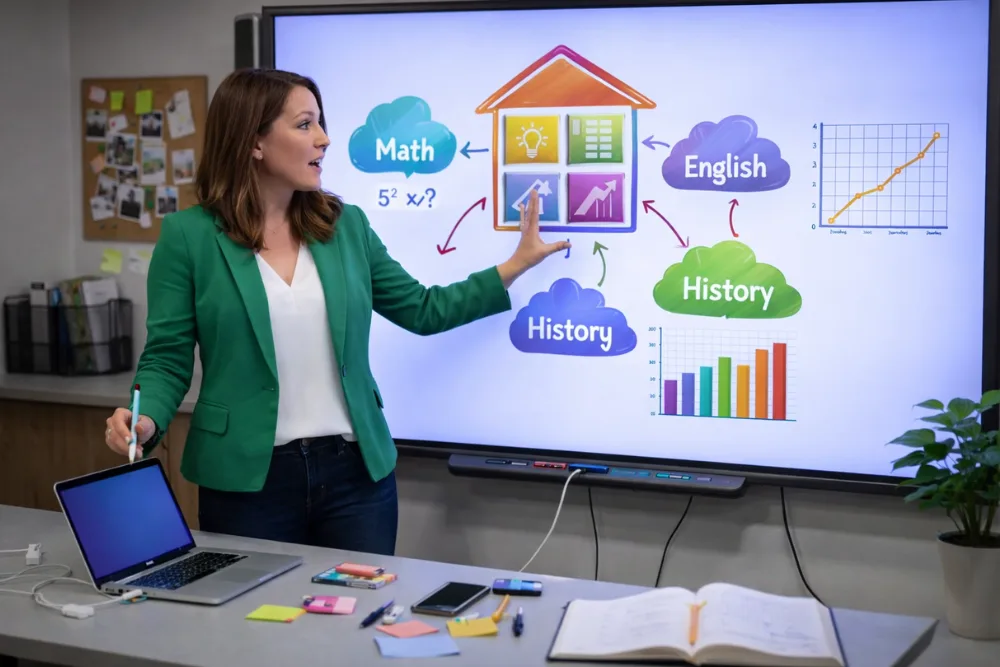
Interactive whiteboards have rapidly become an essential tool for modern homes. Whether you are working remotely, homeschooling children, tutoring students, or collaborating on creative projects, an interactive whiteboard can transform the way you communicate and share ideas. Unlike traditional whiteboards, these digital solutions allow users to write, draw, annotate, and interact directly with content displayed on the screen.
Today, the market offers a wide variety of interactive whiteboards designed specifically for home environments. Some focus on affordability and simplicity, while others deliver advanced features and premium performance. Choosing the right one depends on your budget, available space, and intended use.
This guide explores the best interactive whiteboards for home use with budget friendly options, explains what to look for before buying, and provides practical recommendations to help you make an informed decision.
Interactive Whiteboard Home Buying Guide
Why Interactive Whiteboards Are Ideal for Home Use
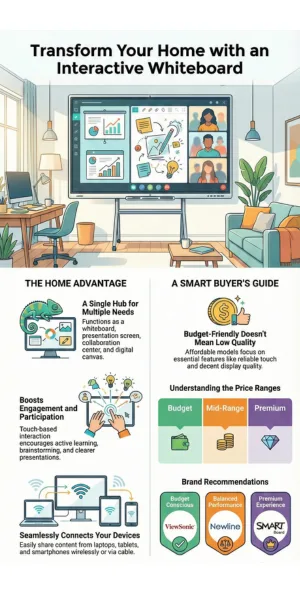
Interactive whiteboards bring professional level technology into the home, creating opportunities for learning and productivity that were once limited to classrooms and offices. One major advantage is versatility. A single board can function as a whiteboard, presentation screen, collaboration hub, and digital canvas.
This makes it useful for families with multiple needs, such as parents working remotely and children attending virtual classes.
Another benefit is engagement. Touch based interaction encourages active participation. Students can write equations, draw diagrams, or highlight text directly on the screen. Adults can brainstorm ideas, annotate documents, and present concepts more clearly.
Interactive whiteboards also support connectivity. Most models connect easily with laptops, tablets, and smartphones, allowing users to share content wirelessly or through cables. This seamless integration makes it easy to switch between devices and tasks. Finally, interactive whiteboards reduce dependence on paper. Notes can be saved, shared, and reused digitally, which supports organization and sustainability.
Understanding Budget Friendly Interactive Whiteboards
Budget friendly does not necessarily mean low quality. Many manufacturers now offer interactive whiteboards with essential features at affordable prices. These models typically focus on reliable touch functionality, decent display quality, and basic software tools. In general, budget options for home use start around 800 dollars. Mid range models fall between one thousand and fifteen hundred dollars. Premium models exceed this range and include advanced software ecosystems and enhanced touch technology.
When evaluating budget friendly options, it is important to focus on value rather than just price. A slightly higher upfront cost may result in better durability, smoother touch response, and longer software support.
Related search: How to Connect an Interactive Whiteboard to a Laptop
ViewSonic Interactive Whiteboards for Home Use
ViewSonic is widely recognized for producing reliable display technology, and its interactive whiteboards are a strong choice for budget conscious users.
| Category | Details |
|---|---|
| Starting Price | Typically starts around 800 dollars. |
| Screen Sizes | Ranges from 55 inches to 86 inches. |
| Touch Technology | Infrared multi touch technology with simultaneous multi user interaction. |
| Software Included | My ViewBoard software. |
| Software Capabilities | Digital whiteboarding, screen sharing, annotation, and file import tools. |
| Strengths | Affordable pricing, wide device compatibility, and simple setup and operation. |
| Ease of Use | Designed for families and individuals who want a straightforward solution. |
| Limitations | Software features are more basic, and touch sensitivity is less refined than premium models. |
| Best Use Case | Ideal for tight budgets, virtual classes, light collaboration, and everyday home productivity. |
Know more about ViewSonic Interactive Whiteboards
Newline Interactive Whiteboards for Home Use
Newline offers a solid mid range option that balances performance, durability, and price.
| Category | Details |
|---|---|
| Starting Price | Generally starts around 1000 dollars. |
| Screen Sizes | Available from 55 inches to 86 inches. |
| Touch Technology | Infrared multi touch technology. |
| Software Included | Newline Interactive Whiteboard Software. |
| Software Capabilities | Whiteboarding, screen sharing, and collaboration tools. |
| Strengths | High quality displays, scratch resistant surfaces, and durable build for frequent use. |
| Display Quality | Sharper images and better color accuracy than entry level models. |
| Limitations | Software may feel less intuitive, and availability can be limited in some regions. |
| Best Use Case | Ideal for users seeking better display quality and durability on a moderate budget. |
Know more about Newline Interactive Whiteboards
SMART Board Interactive Whiteboards for Home Use
SMART Board is one of the most established names in interactive whiteboard technology and is often considered a premium option.
| Category | Details |
|---|---|
| Starting Price | Typically starts around 1500 dollars. |
| Screen Sizes | Ranges from 55 inches to 86 inches. |
| Touch Technology | Digital Vision Touch technology for precise and responsive multi touch interaction. |
| Software Included | SMART Learning Suite with lesson creation tools, collaboration features, and a large library of pre made resources. |
| Strengths | Intuitive interface, robust multi touch and gesture support, and an advanced software ecosystem ideal for education focused households. |
| Touch Performance | Excellent touch accuracy and responsiveness, among the best in the industry. |
| Limitations | Higher price point compared to other interactive whiteboards. |
| Best Use Case | Ideal for users who want a premium interactive experience with advanced software for education or intensive collaboration at home. |
Know more about SMART Board Interactive Whiteboards
What to Look for When Choosing Interactive Whiteboards for Home Use
Selecting the right interactive whiteboard requires evaluating several important factors.
Touch Interactivity
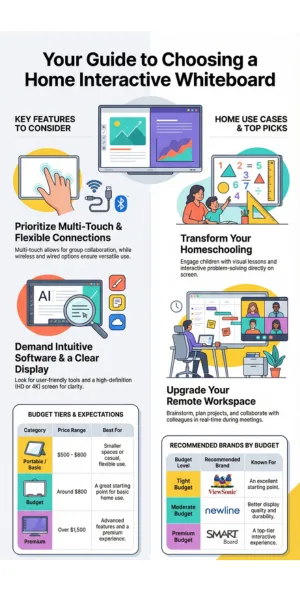
Multi touch support allows multiple users to interact at the same time. This is especially useful for families, group learning, and collaborative projects.
Connectivity Options
Look for boards that offer both wireless and wired connections. Wireless screen sharing is convenient, while wired connections ensure stable performance.
Software Compatibility
The included software should be intuitive and useful. Features such as whiteboarding, annotation, and file sharing are essential. Compatibility with popular operating systems is also important.
Screen Size and Resolution
Larger screens provide a more immersive experience, but they also require more space. High definition or 4k resolution enhances clarity, especially for text and detailed visuals.
Price Range
Budget options start around 800 dollars. Premium models can exceed 1500 dollars. Determine how much you are willing to spend and choose the best value within that range.
Interactive Whiteboard Selection Guide Infographic
Additional Affordable Options
There are also portable and smaller interactive whiteboards priced between 500 and 800 dollars. These are suitable for smaller spaces or casual use. These models often include basic touch functionality and essential software. However, they may lack advanced multi touch support or collaboration features. Portable boards are a good choice for users who need flexibility or have limited space.
How Interactive Whiteboards Support Homeschooling and Remote Work
Interactive whiteboards can significantly enhance homeschooling experiences. They allow parents to display lessons, annotate content, and engage children with visual and interactive activities. Students can solve problems directly on the screen, which reinforces learning. Saved lessons and notes can be reviewed later, helping students stay organized and track progress.
For remote workers, interactive whiteboards serve as a digital workspace. You can brainstorm ideas, plan projects, and annotate documents in real time. Screen sharing makes it easy to collaborate with colleagues during virtual meetings. Having a large interactive display can reduce eye strain compared to working on a small laptop screen.
Related search: Laptop Brands Preferred by Professional Graphic Designers
Creative Uses for Interactive Whiteboards at Home
Beyond work and education, interactive whiteboards support creative activities.
| Focus | Importance |
|---|---|
| Creative Uses at Home | Supports creative activities such as digital sketching and painting, annotating sheet music, planning events, creating vision boards, and designing projects together.
Suitable for a wide range of hobbies and family collaboration. |
| Installation and Setup Tips | Measure wall space and viewing distance before purchase.
Choose between wall mounting or using a stand. Follow manufacturer installation instructions carefully. Ensure a stable home network for reliable wireless screen sharing. |
| Maintenance and Longevity | Clean the screen regularly using appropriate materials.
Avoid sharp objects on the surface. Keep software updated for performance and security. Select reputable brands for better long term support. |
Recommendation for You
For tight budgets and basic home use, ViewSonic is a great starting point. For better display quality and durability on a moderate budget, Newline is a strong option. If your budget allows and you want a premium interactive experience, SMART Board is the best choice. These options balance price, features, and ease of use, making them excellent choices for home environments.
Final Thoughts
Interactive whiteboards are no longer limited to classrooms and corporate offices. In today, they have become accessible and practical for home use. By understanding your needs, setting a realistic budget, and evaluating key features, you can choose an interactive whiteboard that enhances learning, productivity, and creativity. ViewSonic, Newline, and SMART Board each offer compelling options at different price points.
With the right choice, an “interactive whiteboard can become a central tool in your home” for years to come.
Frequently Asked Questions
Are interactive whiteboards worth it for home use?
Yes. They improve engagement, support learning, and enhance collaboration for work and creative activities.
Do I need special software to use an interactive whiteboard?
Most boards include built in software, and many also support third party applications.
Can interactive whiteboards connect to smartphones and tablets?
Yes. Most models support wireless and wired connections with mobile devices.
Which brand is best for homeschooling?
SMART Board is excellent for homeschooling due to its rich educational software, while ViewSonic and Newline also perform well.
How long do interactive whiteboards last?
With proper care, a quality interactive whiteboard can last several years.

Dony Garvasis is the founder of Search Ethics, a platform dedicated to transparency, authenticity, and ethical digital practices. With over 8 years of experience in SEO and digital marketing, I provide expert content on Tech, digital marketing, SEO, Artificial intelligence, gadgets, science, automobiles, lifestyle, tips, tutorials and much more. My mission is simple: Ethical Search, Genuine Results! I will make sure people everywhere get trustworthy and helpful information.